
ATS Explained
The invisible gatekeeper: How ATS software reads CVs and resumes
What is an Applicant Tracking System (ATS)?
An Applicant Tracking System (ATS) is the software employers use to collect, organise, search, filter and rank applications. When you apply for a job, your CV/resume may first be processed inside an ATS before a recruiter reviews it. The system helps employers manage large volumes of applications and identify candidates based on job-related criteria.
What does this mean for you?
An ATS does not interpret a CV/resume exactly like a human reader. It parses the document into structured information (opens in a new tab) such as contact details, work experience, education, skills, job titles and dates. Clear formatting, recognisable section headings and relevant terminology can therefore make the document easier for recruitment software to process accurately.
Complex layouts, graphics, unusual formatting or poorly structured information can create parsing problems (opens in a new tab) in some systems. Keywords also matter because recruiters may search, filter or rank candidates (opens in a new tab) using terms related to the role. Harvard Business School research found that, among surveyed employers using recruitment management systems, 94% used them to rank or filter middle-skills candidates and 92% did so for high-skills candidates during initial screening. This makes machine-readable structure and relevant job terminology important parts of an ATS-friendly CV/resume.
Sources & documentation:
- Harvard Business School (2021). Hidden Workers: Untapped Talent. Research on automated hiring systems and how recruitment management systems are used to filter and rank candidates, produced in collaboration with Accenture. Read the report here. (opens in a new tab)
- CNBC (2019). Media overview of Applicant Tracking Systems, resume formatting and common ATS-related job application advice. Read the article here. (opens in a new tab)
Why does my CV need to be machine-readable?
A strong CV/resume should work for both software and people. It needs a clear, machine-readable structure for ATS parsing while remaining accurate, relevant and compelling for the recruiter who may review it afterwards.
Adapt to Success: Optimising for ATS
How do I optimise my CV for machine readability?
Your CV/resume should communicate your skills without unnecessary formatting getting in the way. ATS.rip restructures the information you provide into a clean, machine-readable format designed for ATS parsing. The optimisation focuses on structure, formatting, wording and relevant keywords while preserving the professional information contained in your original document.
Start with a real CV/resume
ATS.rip optimises an existing CV/resume: it does not create one from random text or unrelated documents. Upload a genuine document containing your professional background, education, skills or other relevant career information. The quality and accuracy of the optimised result depend on the information you provide.
Why the .rip domain?
The .rip domain is a playful reference to putting ATS-unfriendly CV formatting to rest. ATS.rip is designed to help your CV communicate more clearly with recruitment software while preserving the factual information that makes it yours. The goal is simple: adapt the CV to the software without changing the candidate behind it.
What is Targeted optimisation?
A generic CV/resume may not reflect the terminology used for a specific role. With Targeted optimisation, you can paste the job description you are applying for. ATS.rip analyses the text and aligns your CV/resume with relevant keywords and terminology from that role while keeping the optimisation based on the information you supplied. You adapt the CV to the software without changing the candidate.
What does "less than a minute" mean?
ATS.rip is designed around a fast and simple workflow. In typical use, selecting and uploading your CV/resume, optionally pasting a prepared job description, and submitting the information for optimisation can be completed in less than a minute. The optimisation itself is normally completed in seconds.
"Less than a minute" is an estimate of a typical user flow and not a guaranteed processing time. Actual processing time may vary depending on document length, optimisation type, network conditions, and the availability and response time of third-party AI services.
Can I use ATS.rip with a non-English CV?
Yes. ATS.rip works with CVs in any language and always keeps the optimisation in the language of your original CV. Your Spanish CV stays Spanish. Your Punjabi CV stays Punjabi. Your Chinese CV stays Chinese. Neither the language of the job description nor the language this site is displayed in changes that.
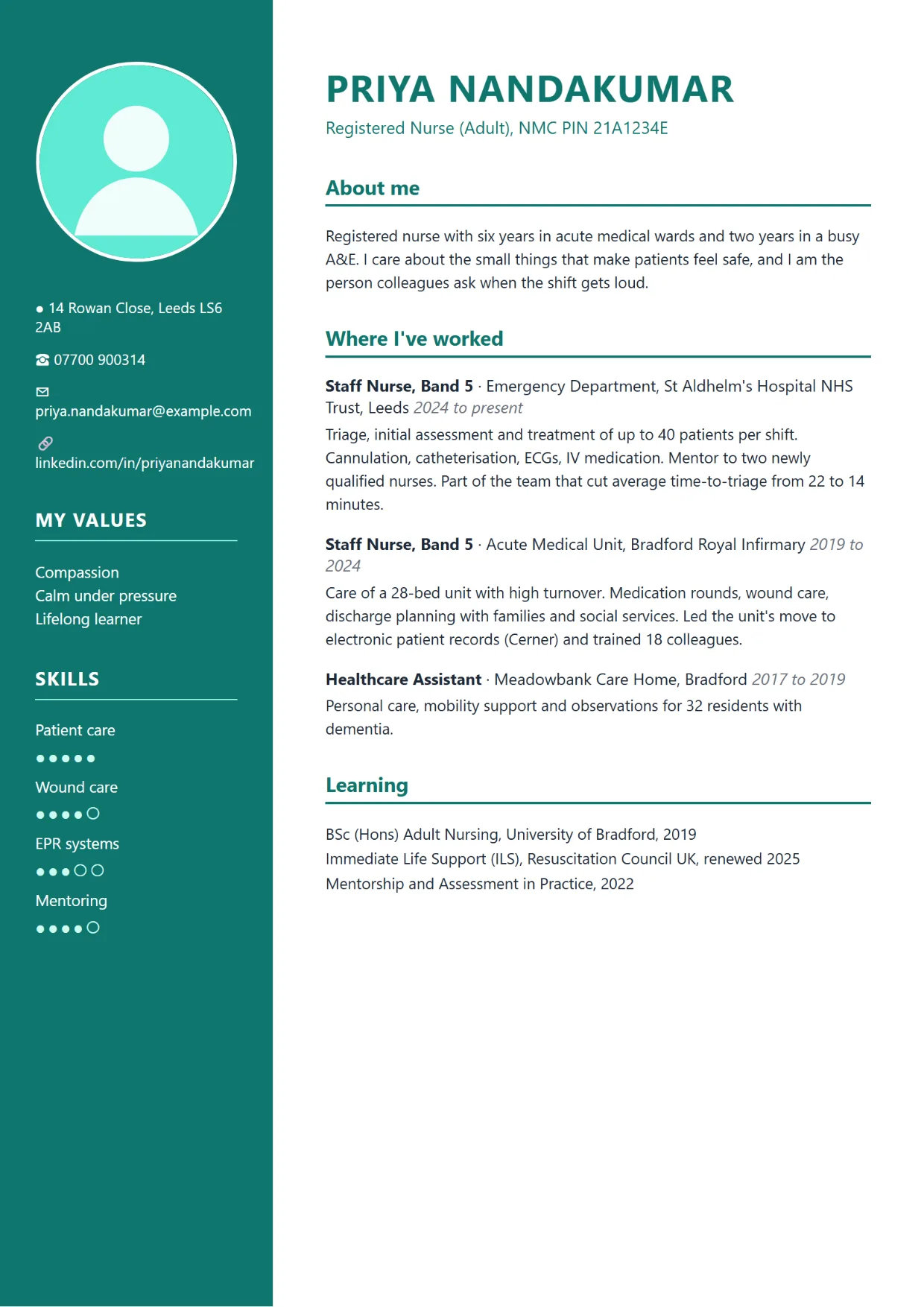
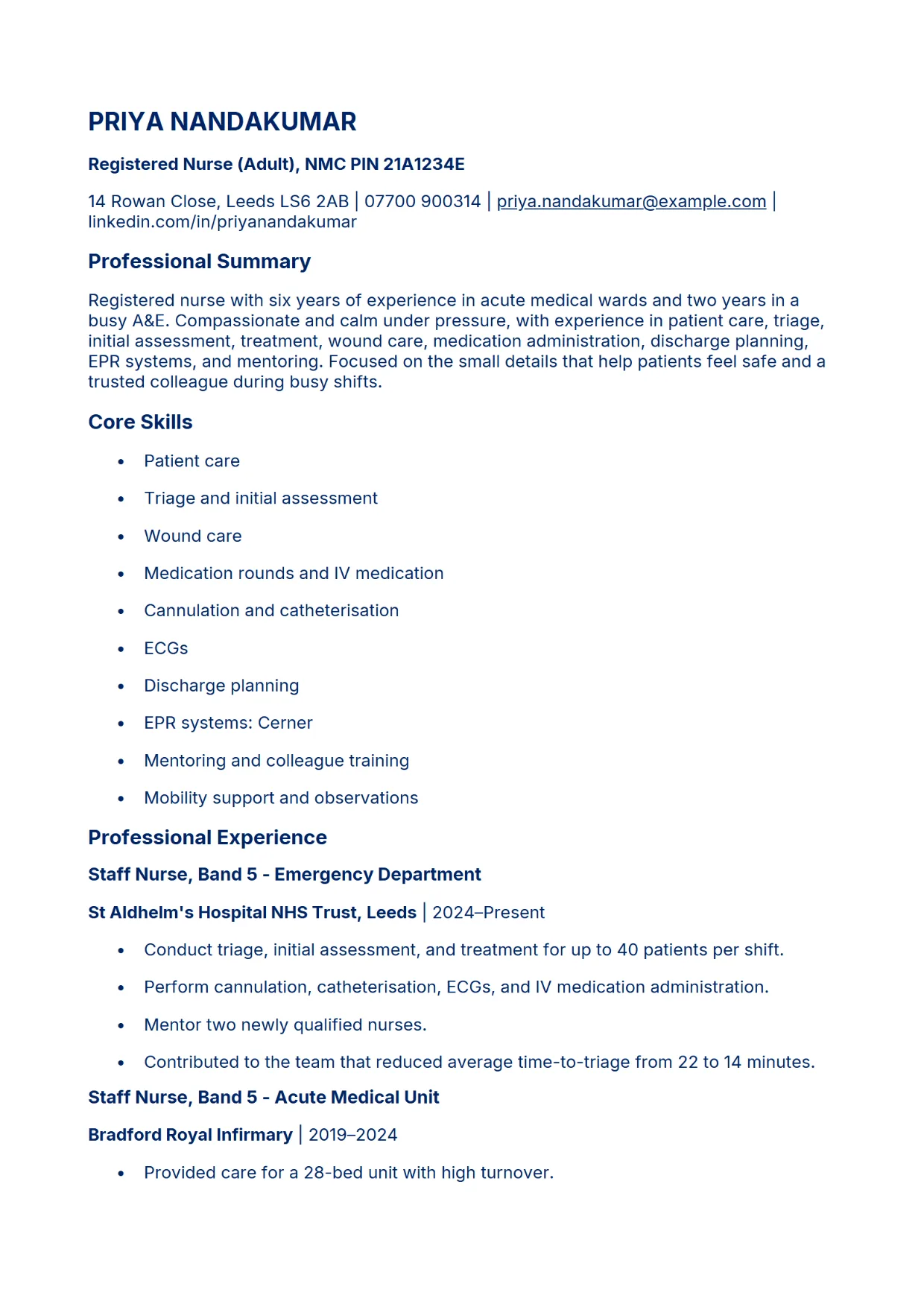
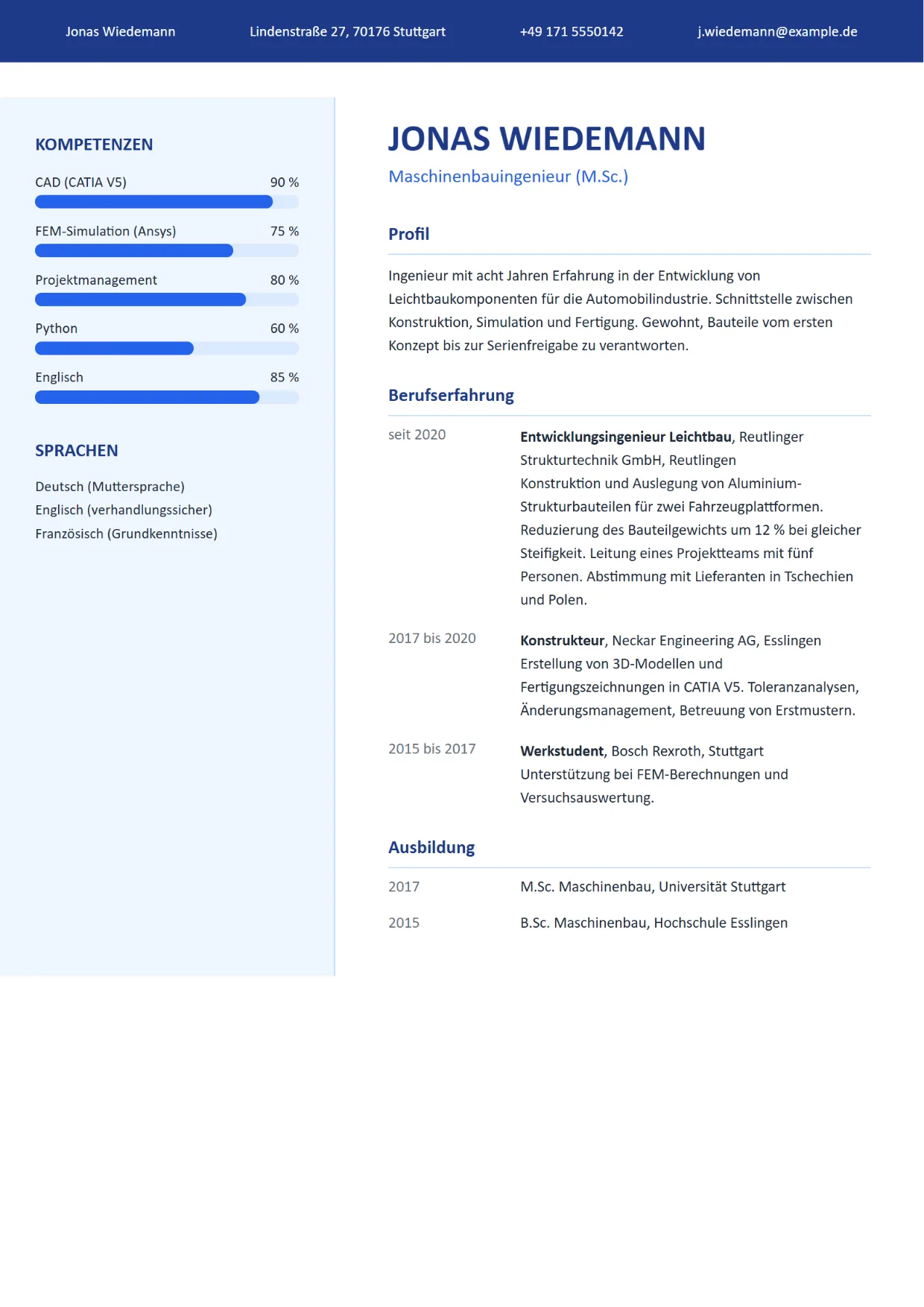
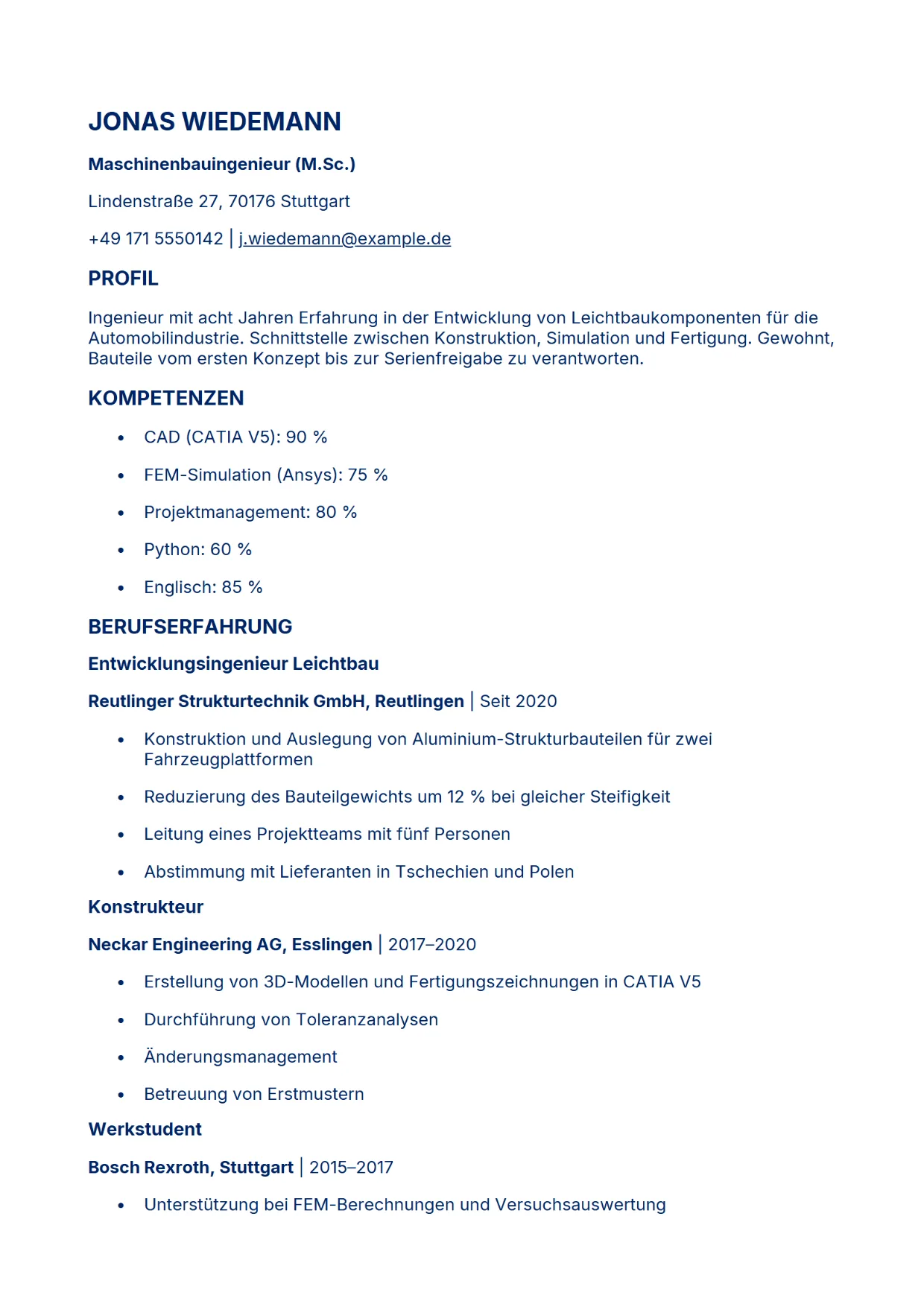
Four before-and-after examples
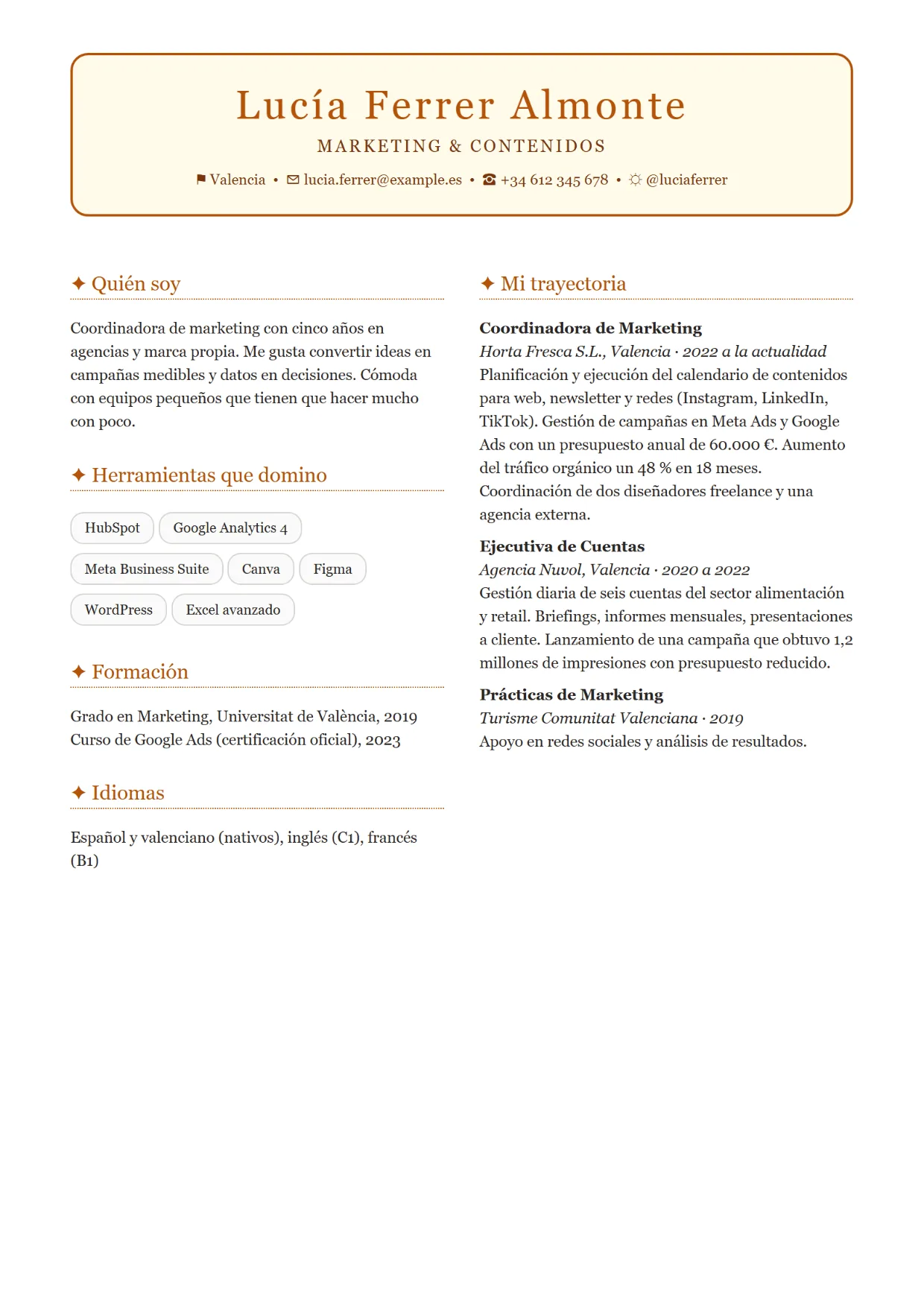
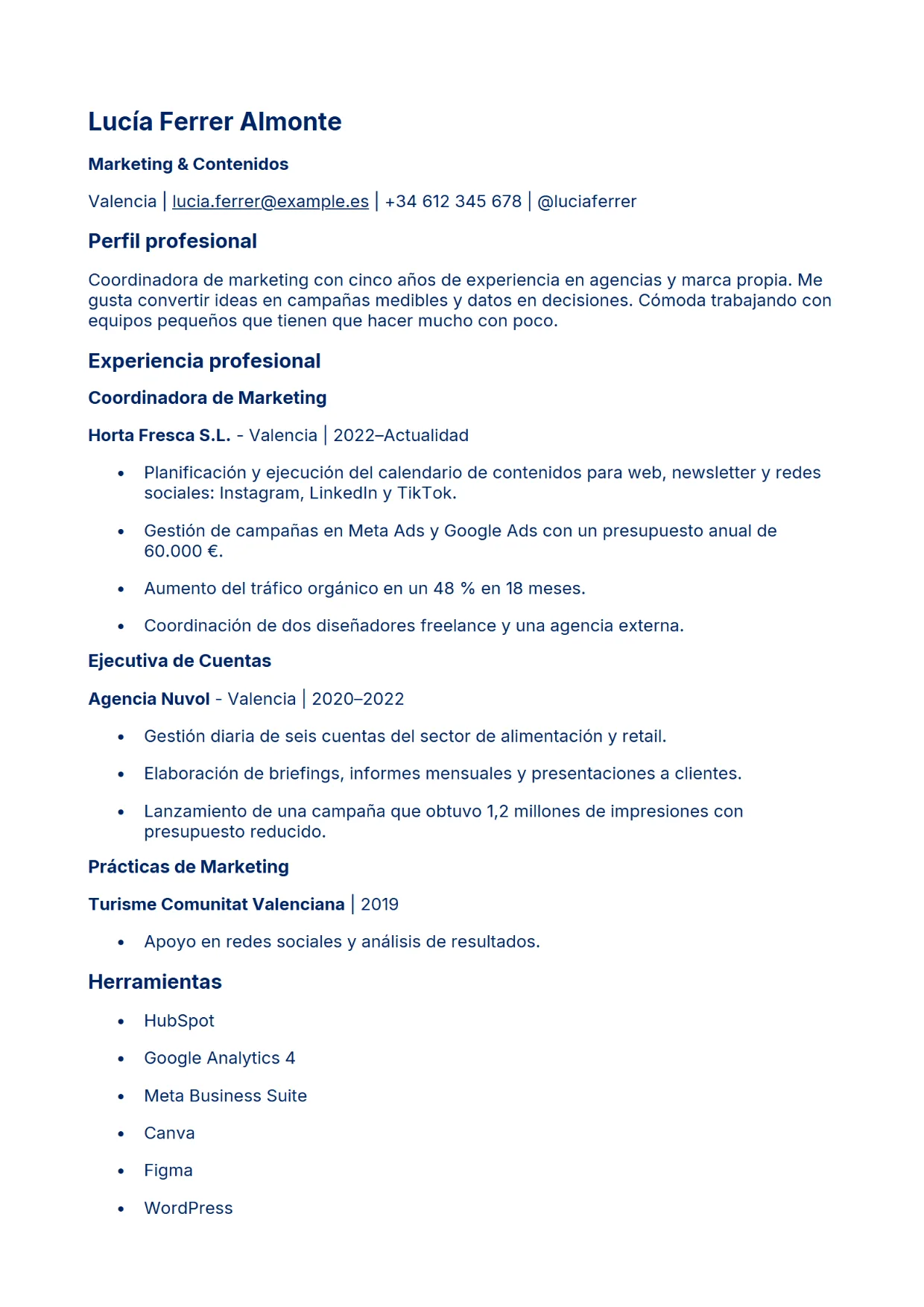
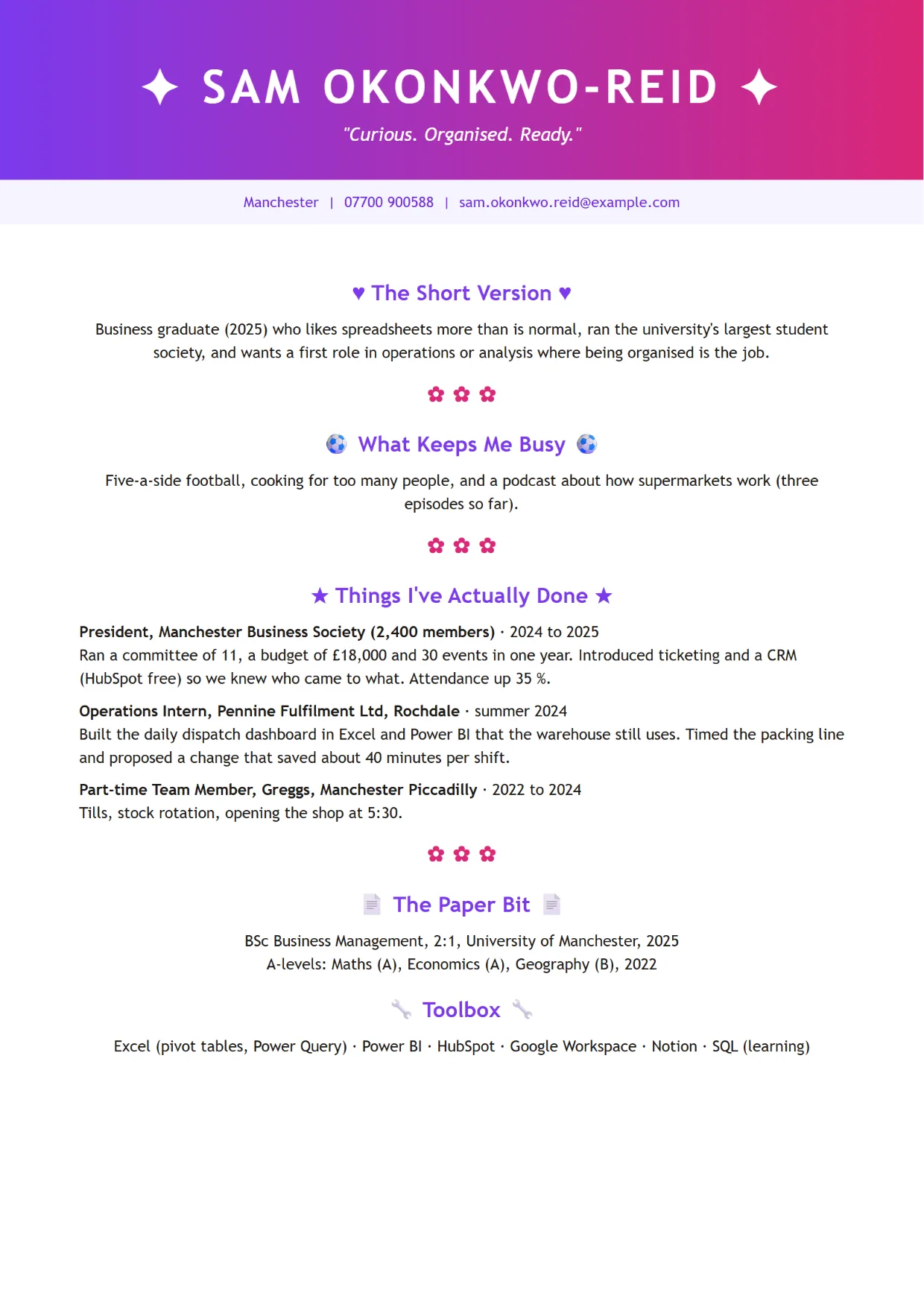
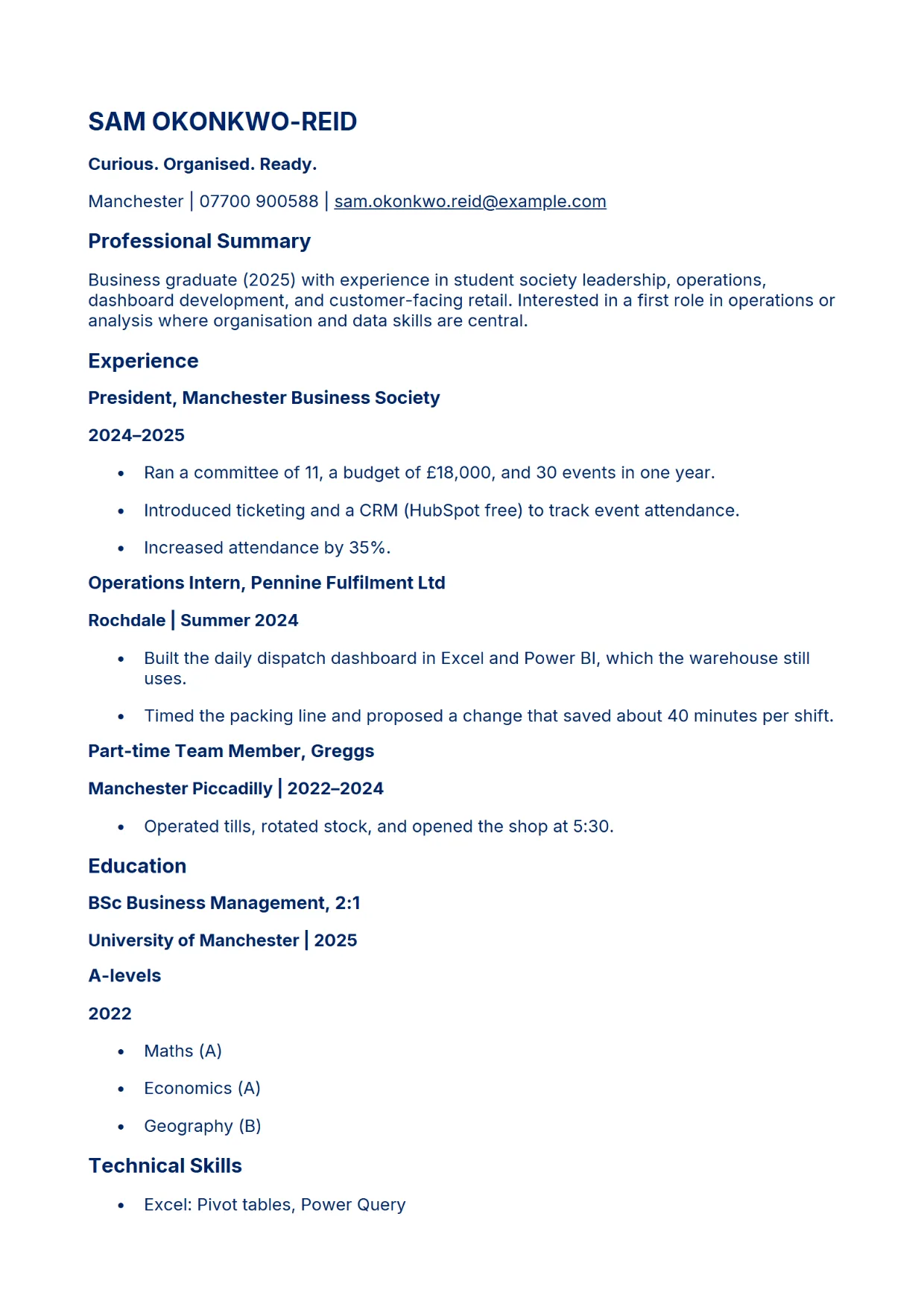
Four fictional CVs, written for this page, were run through ATS.rip without a job description (Standard optimisation). The first image is the uploaded CV, the second is page one of the optimised version exactly as ATS.rip delivers it. Names, employers and details are invented; nothing in the examples comes from a real customer. The facts stay the same. What changes is the structure: one column, standard section headings and plain text instead of graphics, skill bars and tables, so recruitment software can read every line.
Nurse, United Kingdom (English)
Mechanical engineer, Germany (German)
Marketing coordinator, Spain (Spanish)
Business graduate, United Kingdom (English)
Adapt to Success compared with Jobscan, Teal, Enhancv, Resume Worded and Kickresume
Introduction
These are the five tools you will meet when you search for help with your CV. This page puts them next to Adapt to Success on the points that decide what you actually pay and what you get: the price, what the free plan really gives you, whether you need an account before you see anything, whether you see a finished document before you pay, what happens to your CV afterwards, and how refunds work.
The facts come from their own pricing, terms and privacy pages and from independent reviews, all read on 3 October 2026. Prices and terms change, so check theirs before you decide. Where one of them is the better choice, we say so.
Adapt to Success compared with the five best-known tools
| Tool | Adapt to Success | Jobscan | Teal | Enhancv | Resume Worded | Kickresume |
|---|---|---|---|---|---|---|
| Account before you see anything | No | Yes | Yes | Yes | Yes | Yes |
| Finished document before you pay | Yes | No | No | No | No | No |
| Your CV stored afterwards | No | Yes | Yes | Yes | Yes | Yes |
| A subscription that renews | No | Yes | Yes | Yes | Yes | Yes |
| Price | EUR 6.99 or EUR 7.99, once | USD 49.95 a month | USD 29 a month | USD 29 a month | USD 49 a month | EUR 24 a month |
In detail
| Tool | Best for | Price | What you get free | Account before you see anything | Finished document before you pay | Your CV stored | Refund |
|---|---|---|---|---|---|---|---|
| Adapt to Success | One CV, read once and made readable for the software and the recruiter, in the language it is written in. Seven site languages, including Arabic, Hindi and Chinese. | EUR 6.99 (Standard) or EUR 7.99 (Targeted), once, VAT included. No subscription. | The whole optimised CV on screen, before and after. | No | Yes, the whole document on screen. | No | Purchases are final after the full preview. Full refund if the file is not delivered. |
| Jobscan | Checking one CV against many job ads. Scanner, LinkedIn review and job tracker, if you send fifteen or more applications a month. | USD 49.95 a month or USD 89.95 a quarter, after a trial that needs a card. | Five scans a month: a match score and a shortened list of missing keywords. No rewrite. | Yes | No. A report; the rewrite is Premium. | Yes, the last twenty scans. Deletion through support. | Two days, minus a 3.5% fee. |
| Teal | Keeping many applications in order: builder, job tracker and a Chrome extension in one place. | USD 13 a week, USD 29 a month or USD 79 a quarter. | A score and five keywords. The CV you build yourself downloads as PDF. | Yes, plus a questionnaire | No | Yes, in the US and sent to OpenAI. Deleted thirty days after you ask. | Two days on the weekly plan, seven on the monthly, not guaranteed. |
| Enhancv | A designed CV from more than ninety templates, and translating a CV into another language. | USD 29 a month, USD 59 a quarter or USD 99 every six months. | Seven days in the editor with a watermark on downloads. The checker is partly locked. | Yes | No, watermarked. | Yes, without limit. Sent to OpenAI and HrFlow.ai. | The monthly plan is not refundable. |
| Resume Worded | Line-by-line feedback and a LinkedIn profile review. Forty-five free generators. | USD 49 a month, USD 99 a quarter or USD 229 a year according to reviews. The price is shown after sign-up. | A score and the first fixes. You edit and upload again yourself. | Yes | No | Yes. Deletion by email within forty-eight hours. | None on a first purchase. |
| Kickresume | Building a CV, a cover letter and a personal website from more than forty templates. Free for students. | EUR 24 a month, EUR 54 a quarter or EUR 96 a year. | Four templates. Export as a PNG of page one or a marked DOCX. | Yes | No | Yes, for five years. Used anonymised for training. | Fourteen-day guarantee. The terms also say non-returnable. |
Prices and terms as published on 3 October 2026. Monthly plans renew until you cancel; ours is one payment.
When one of them is the better choice
- You send fifteen or more applications a month and want to check each one against the job ad. Jobscan's and Teal's unlimited scans cost less than one Targeted CV per application.
- You want a place to come back to: a job tracker, a builder, an account with your drafts. Teal and Jobscan are built around that. Adapt to Success is a single action with nothing kept.
- You want a designed CV from a template, or the same CV in another language. Enhancv and Kickresume do both. We optimise in the language your CV is written in and keep the layout plain, because that is what the software reads best.
- You want a cover letter, a LinkedIn review or a personal website in the same tool. Kickresume and Resume Worded cover the whole application. We cover the CV.
What you only get here
- The whole result before you pay: your CV before and after, on screen, page by page.
- One payment, no subscription. Nothing renews, nothing to cancel.
- No account. Upload, look, decide.
- Your CV is not kept after the optimisation, not here and not at an AI company.
- The file you get is a DOCX you can keep editing, in the language your CV is written in.
We cannot promise the call. We can promise a CV the software can read and the recruiter can find.
Sources
All pages read on 3 October 2026.
- Jobscan. Terms of Use and Cancellation Policy. jobscan.co (opens in a new tab)
- Jobscan. Privacy Policy. jobscan.co (opens in a new tab)
- Teal. Pricing. tealhq.com (opens in a new tab)
- Teal. Terms of Service and Privacy Policy. tealhq.com (opens in a new tab)
- Enhancv. Pricing. enhancv.com (opens in a new tab)
- Enhancv. How can I get a refund? and Privacy Policy. help.enhancv.com (opens in a new tab)
- Resume Worded. Pricing plans and Terms. resumeworded.com (opens in a new tab)
- Resume Worded. Privacy Policy. resumeworded.com (opens in a new tab)
- Kickresume. Pricing. kickresume.com (opens in a new tab)
- Kickresume. Terms and Privacy Policy. kickresume.com (opens in a new tab)